

Operating System Check
Please check the System Requirements below.
Browser Check
Please check the System Requirements below.
- The "Modern UI version of IE" is not supported. Please use "Desktop version of IE".
- Chrome 42 and above are not supported because the Adobe Reader plug-in is no longer supported in Chrome. Please use another browser such as IE.
- Firefox 52 and above are not supported because the browser plug-in is no longer supported. Please use another browser such as IE.
Please follow the procedure below to open this page with Internet Explorer.
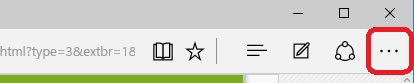
1. Push the menu button at upper-right of this browser.
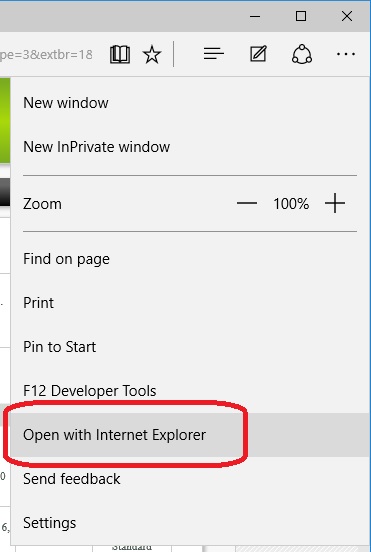
2, Select "Open with Internet Explorer".
Update Flash Player
Flash Player installed on your PC needs to be updated.
Please update it by clicking below.
- If update is failed, download and install it from below.

Install Flash Player
Flash Player is not installed on your PC.
Please download and install it by clicking below.
Update Adobe Reader
Adobe Reader installed on your PC needs to be updated.
Please download and install it by clicking below.

- You should uninstall old version of Adobe Reader first when you already installed it.
Install Adobe Reader
Adobe Reader is not installed on your PC.
Please check following.
If Adobe Reader is not yet installed, download and install it now by clicking below.
- You should uninstall old version of Adobe Reader first when you already installed it.
- You needs Adobe Reader 10.1.3 or higher. If you are using Adobe Reader 10, please start Adobe Reader and update from menu [Help]>[Check for Updates].
Install bookend Desktop
bookend Desktop was not found on your PC.
If bookend Desktop is not yet installed,
download and install it now by clicking below.
*bookend Desktop 2.7.0 or above is required on Chrome 42 or above.
*bookend Desktop 0.88.0 or above is required on Chrome 42 or above.


* If you don't have administrator's privilege, download the Zip file from here.
You have to install Chrome Extension on Chrome 42 or above. Please install it from below.

- If you already have bookend Desktop and are still seeing this message, restart bookend Desktop and try again.
- If you restart bookend Desktop and are still seeing this message, restart Browser and try again.
- The "Modern UI version of Browser" is not supported. Please use "Desktop version".
Update bookend Desktop
bookend Desktop installed on your PC needs to be updated.
Please download and install it now by clicking below.
* If you don't have administrator's privilege, download the Zip file from here.
- You need restart browser.
| Item | Detected | Result |
|---|---|---|
| Operating System | OK NG | |
| Browser | OK NG | |
| Flash Player | Not found | OK NG |
| Adobe Reader | Not found | OK NG |
| bookend Desktop | Not found | OK NG |
Check OK. You will be redirected in seconds.
You can move to the page now by clicking here
Check OK. Please click here to move page.
Check OK.
Please close this window.
Check OK.
Please restart Browser.
------------- Log --------------
DRM(Digital Right Management) is KEYRING.NET
Copyright © 2005-2015 iDOC K.K. All Rights Reserved.